



 Contact Us

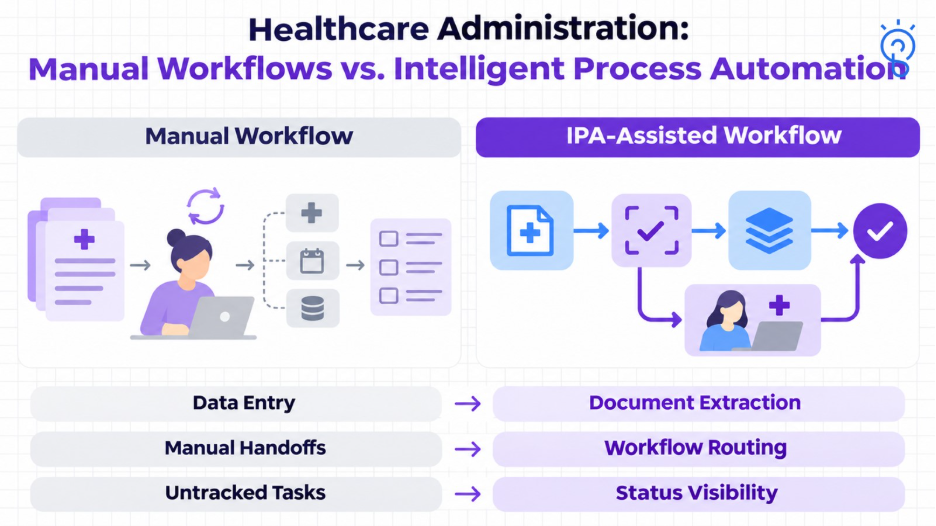
Intelligent process automation (IPA) in healthcare combines artificial intelligence, robotic process automation, and workflow management to handle repetitive tasks such as processing documents, checking insurance eligibility, and updating records. It helps reduce manual effort, improve consistency, and route exceptions to staff for review.
Healthcare teams often move information between documents, clinical systems, and insurance platforms. Connecting these activities can reduce repeated data entry and make it easier to identify incomplete requests and pending approvals.
This guide explains healthcare IPA use cases, benefits, integration requirements, and implementation challenges. It also covers security, oversight, and how to evaluate costs and business value before expanding automation.
What Is Intelligent Process Automation in Healthcare?
Intelligent process automation, or IPA, is an approach to coordinating business processes using AI, workflow orchestration, and execution technologies such as APIs or robotic process automation.
In healthcare, an IPA application might extract information from a referral, validate required fields, check an external response, and route the case for review. The main purpose is to improve the process’s completed outcome, including its exceptions and handoffs.
AI provides capabilities such as document interpretation or classification. IPA applies those capabilities within an operating process.
The focus here is healthcare administration and supporting workflows. Automating information movement does not establish authority to make clinical decisions.
How Does IPA Combine AI, RPA, and Healthcare Workflows?
An IPA application separates interpreting information, coordinating work, and executing approved operations. The technologies contribute different functions rather than competing to control the entire process.
| Function | Supporting capability | Healthcare example |
|---|---|---|
| Interpret | AI, document processing, and language understanding | Extract referral details and classify the request |
| Coordinate | Workflow management, rules, and case queues | Check completeness and assign an exception |
| Execute | APIs, integrations, or RPA | Retrieve a response or update an approved record |
What is the Difference Between RPA and IPA in Healthcare?
| Aspect | RPA | IPA |
|---|---|---|
| Core function | Executes predefined, rules-based tasks in software. | Combines AI, workflow orchestration, and execution technologies such as RPA. |
| Data handling | Typically works with structured inputs and predictable formats. | Can interpret documents and extract information for validation. |
| Healthcare example | Copies verified registration fields into an application. | Extracts registration details from a referral, validates fields, and routes uncertain information for staff review. |
| Exception handling | Follows configured rules when a task fails or an input is unexpected. | Adds AI-assisted interpretation and coordinated review of incomplete or uncertain cases. |
| Best fit | Repetitive tasks with stable rules and interfaces. | Workflows involving varied documents, information interpretation, and multiple handoffs. |
How Does IPA Interpret Documents?
Computer vision supports the visual interpretation of images and document layouts. Optical character recognition, or OCR, extracts text; intelligent document processing can combine OCR with models that identify fields, tables, and document structure.
This document-processing capability should be distinguished from interpreting medical images for diagnosis, which requires separate task-specific assessment.
A Practical Referral-Intake Example
Consider a hypothetical referral workflow:
- Receive a referral through an authorized channel.
- Identify the patient and extract relevant administrative details.
- Validate the information against the source and required fields.
- Check whether supporting records are available.
- Route incomplete or uncertain cases to the appropriate team.
- Submit approved updates through a controlled integration.
- Confirm the update and track outstanding work.
An unreadable document or possible patient mismatch should trigger review. The system should not guess missing clinical facts to make the workflow appear complete.
What are the Main Use Cases of Intelligent Process Automation in Healthcare?
Useful healthcare IPA use cases combine meaningful administrative volume with a clear process owner and verifiable completion. The examples below describe application designs rather than guaranteed outcomes or reported SapidBlue customer results.
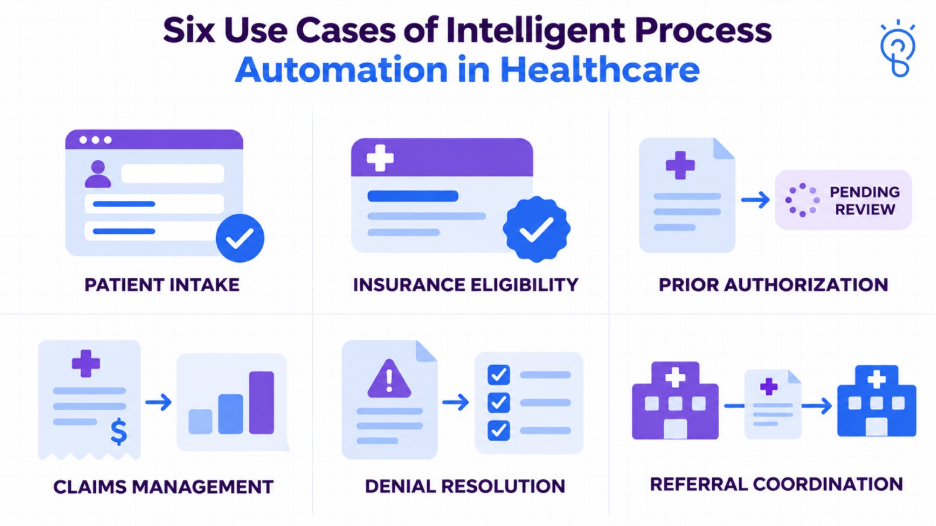
1. Patient Registration and Intake
IPA can extract information from submitted forms, check required fields, and prepare updates for a registration team.
It can also flag inconsistent identifiers or missing documentation before the appointment. Matching information to the correct patient record is a separate control; a plausible name or date of birth is insufficient evidence by itself.
Start by measuring manual handling time, correction rates, and cases that arrive incomplete.
2. Insurance Eligibility and Benefits Verification
IPA can initiate authorized eligibility inquiries, interpret responses, and route unresolved coverage questions before service delivery.
An application can capture the response, the requested service date, and unresolved exceptions. It should distinguish a completed technical inquiry from usable coverage information.
Eligibility information is not a guarantee of payment. Authorization, service details, policy conditions, and adjudication can affect the final outcome.
3. Prior Authorization Preparation and Tracking
IPA can help identify required information, assemble supporting documents, submit through available interfaces, and track the payer’s response.
It can also flag missing attachments and route requests for clinical review. The automation should preserve the evidence supporting a submission and the authority of the submitting professional.
The payer makes the authorization decision. The application should not represent a prepared or submitted request as an approval.
As of October 2026, the U.S. 2024 CMS Interoperability and Prior Authorization Final Rule has operational provisions beginning in 2026 and API requirements primarily beginning in 2027 for impacted payers. Exact applicability and dates depend on payer type. The rule’s prior-authorization provisions exclude drugs.
An implementation must check each payer’s available interfaces and requirements rather than assuming universal API support.
4. Revenue Cycle Management and Claims Follow-Up
Healthcare revenue cycle management, or RCM, contains several potential automation points: registration checks, documentation completeness, pre-submission validation, claim-status retrieval, and work-queue routing.
IPA can connect a status response to the appropriate account and next action. It must also reconcile submitted work with acknowledged results so retries do not create duplicate transactions.
Technical claim rejections, adjudicated denials, and requests still awaiting a decision should remain distinct.
5. Denial Prevention and Resolution Support
IPA can address preventable errors by checking identifiers, required attachments, submission completeness, and known administrative rules before a claim proceeds.
For denied claims, it can categorize the stated reason, collect relevant evidence, and route the case to the appropriate billing or clinical specialist.
Reducing denials requires addressing the actual cause. Faster resubmission will not fix missing supporting documentation or an unresolved coverage issue.
An appeal draft should use verified records and remain subject to authorized review. Never count the billed amount of every flagged claim as recovered revenue.
6. Referral Coordination and Appointment Administration
IPA can monitor outstanding records, route referral tasks, send approved administrative reminders, and track whether a case has progressed.
For scheduling, use validated availability and the organization’s routing rules. Clinical urgency and suitability should follow the authorized clinical process.
What Benefits Can Healthcare Organizations Expect From IPA?
IPA can reduce repeated handling and improve process visibility when the workflow, data, and controls are suitable. Benefits should be measured against the existing process.
| Potential benefit | Evidence to measure |
|---|---|
| Less repetitive work | Net staff handling time after review and correction |
| More consistent submissions | Missing-field rates, pre-submission exceptions, and rework |
| Faster administrative progression | Time between receipt, review, submission, and confirmed response |
| Better use of specialist time | Routine work removed and exception workload remaining |
| Improved follow-up visibility | Cases without an owner, overdue tasks, and unresolved queues |
| Fewer preventable billing problems | Error and denial categories addressed by the automation |
Before deployment, record a baseline over a representative period: task volume, case complexity, staff handling time, errors, and completion rates. Compare pilot results with similar cases and account for changes in staffing, payer mix, or workload.
Evaluate correctly completed workflows, including their review, correction, and retry costs. Track completion rates and unresolved backlogs alongside speed so difficult cases cannot disappear from the results. For prior authorization, distinguish preparing a request, submitting it, and receiving the payer’s decision. A faster submission alone does not demonstrate a faster completed authorization process.
These outcomes are not automatic. An application can move work faster while creating a larger correction queue.
How Does IPA Integrate with EHR and Legacy Systems?
IPA connects through supported interfaces while preserving the EHR’s permissions, patient identity, and record rules. Integration design depends on which information and operations the specific system exposes.
The U.S. health IT agency describes HL7 FHIR as an API-focused standard for representing and exchanging health information. FHIR support does not mean every administrative transaction or write operation is available through the same interface.
Depending on the workflow, an implementation may use:
- Supported EHR or practice-management APIs.
- FHIR resources and established health-information interfaces.
- Payer, clearinghouse, or administrative transaction connections.
- Controlled RPA for applications with limited integration options.
Browser or desktop automation needs maintenance when screens, sessions, or authentication behavior change. Prefer a supported interface where it meets the task.
Before enabling updates, define the source of truth, required identifiers, permitted fields, and confirmation response. Account for partial failures across systems and ensure repeated requests cannot duplicate the intended action.
What are the Main Implementation Challenges?
Healthcare IPA projects often encounter gaps between a process that is understood informally and one that can be executed consistently by software.
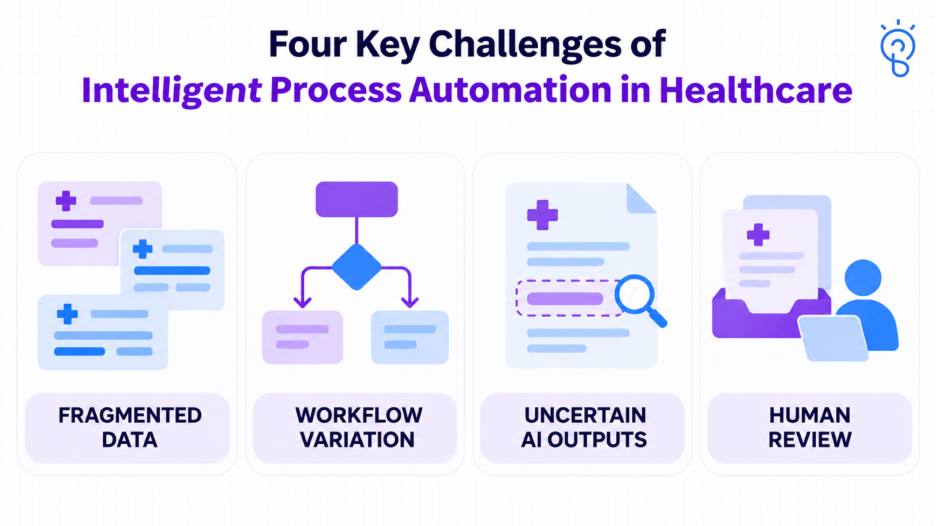
Fragmented and Inconsistent Information
Records may use different identifiers, field meanings, formats, or versions. Source documents can be incomplete or difficult to read.
Build representative test data around those variations. Assign owners for source quality, mappings, and changes rather than treating data preparation as a one-time activity.
Workflow Variation and Payer Requirements
Requirements can differ by payer, service, location, and contract. A rule that worked during the pilot may become outdated.
Version the rules and evidence used for each decision. Establish who reviews changes and how the application identifies unsupported cases.
Uncertain Model Outputs
An extraction or classification can look plausible while being wrong. A model’s confidence score is not a universal guarantee of correctness.
Evaluate important fields separately, including patient identifiers, service dates, and information that affects routing. Use validation and review thresholds matched to the consequences of error.
Exception Handling and Staff Adoption
A workflow needs an owner when automation cannot proceed. Review queues require assignments, escalation rules, and usable context.
Staff should understand what was extracted, what remains uncertain, and what action is proposed. Measure the effort required to resolve exceptions alongside the work removed.
Considering a healthcare workflow for automation? Discuss its bottlenecks, data dependencies, and acceptance criteria with SapidBlue.
What are the Privacy and Security Risks of Healthcare IPA?
Healthcare automation can expose sensitive information through connected applications, document stores, logs, model services, or excessive bot permissions. It can also compromise data integrity by writing information into the wrong record.
A practical control plan should address:
- Access: Use scoped workload identities and enforce authorized patient, tenant, and organizational boundaries.
- Data exposure: Limit the information sent to each component and avoid unnecessary sensitive content in logs.
- Protection: Select appropriate encryption, credential management, retention, and recovery controls.
- Execution: Validate inputs and restrict writes to the operations the workflow needs.
- Oversight: Retain an audit trail of sources, approvals, actions, and confirmed results.
- Suppliers: Review subprocessors, data locations, service terms, and incident responsibilities.
How Do You Implement Intelligent Process Automation in Healthcare?
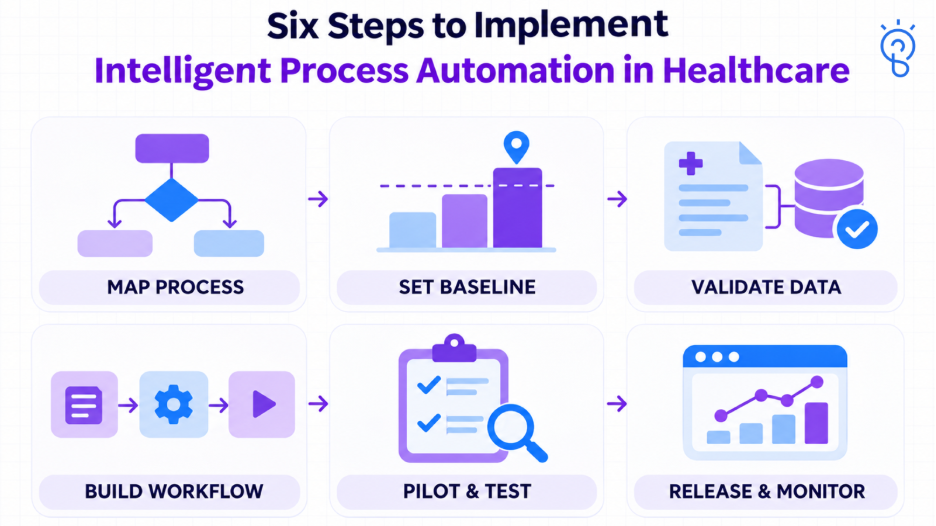
Begin with one bounded process and measurable acceptance criteria. Prove that the complete workflow works under realistic conditions before expanding its scope.
Step 1: Select and Map the Process
Identify the business owner, users, systems, task volume, and current failure points.
Document the normal path and exceptions. Remove unnecessary steps before automating them.
Step 2: Establish the Baseline and Boundaries
Measure current handling time, elapsed time, rework, and costs. Define what the application may read, prepare, submit, or update.
Agree on review requirements and a manual fallback. An unsupported case should remain visible and assigned.
Step 3: Validate Data Access and Integration
Test patient matching, source mappings, permissions, and required interfaces early.
Confirm that a submission can be tracked to its acknowledged result. Do not build the pilot around integrations that will be unavailable during rollout.
Step 4: Build the Smallest Complete Workflow
Connect document interpretation, deterministic checks, task routing, execution, and confirmation for the selected scope.
Use AI where interpretation helps. Fixed rules, calculations, and existing software features may already solve other steps reliably.
Step 5: Evaluate and Pilot with Users
Test representative document types, unreadable inputs, mismatched identifiers, duplicates, delayed responses, expired credentials, and interrupted execution.
Start with shadow evaluation or supervised operation. Shadow testing can reveal technical issues; supervised use is needed to establish review effort and practical usability.
Step 6: Release Gradually and Maintain Ownership
Assign responsibility for incidents, data quality, payer-rule changes, integrations, and evaluation assets.
Monitor both outcomes and exceptions. Expand only when the operating team can sustain the service and the measured benefits justify it.
How Do You Measure the Cost and ROI of Healthcare IPA?
Calculate value from completed work and realized improvements. The business case must include review, exception handling, maintenance, and implementation costs.
Cost categories include workflow discovery, data preparation, document processing, integrations, software licensing, infrastructure, security assessment, testing, training, and ongoing support.
Use the same time horizon for benefits and costs:
ROI (%) = [(Realized benefits − Total costs) ÷ Total costs] × 100
Estimate time released using:
Annual task volume × Eligible share × Adoption × Net time saved per handled task
Net time saved includes corrections and manual follow-up. Treat released staff time as capacity unless the organization can demonstrate a corresponding reduction in expenditure.
Illustrative First-Year ROI Calculation
Assume a hypothetical administrative process has:
- 50,000 tasks each year.
- 80% task eligibility.
- 75% adoption within that eligible workload.
- Four minutes of net time saved per handled task.
That produces 30,000 handled tasks and releases 2,000 hours. If the organization can realize $30 of value per hour, the capacity benefit is $60,000.
Add $10,000 of separately verified avoided external costs, without counting the same benefit twice. Total first-year benefit is $70,000.
If implementation and first-year operation cost $50,000:
First-year ROI = ($70,000 − $50,000) ÷ $50,000 × 100 = 40%.
These are illustrative assumptions, not market prices, a forecast, or a measured SapidBlue result.
Measure RCM Outcomes Without Inflating Returns
For billing workflows, track clearly defined claim cohorts and separate technical rejections from adjudicated denials. Allow enough time for payment outcomes to mature.
Count incremental collections only when they are attributable and realized. Faster cash receipt is not automatically additional revenue, and total billed charges do not represent recoverable value.
Also monitor administrative queue age, unresolved exceptions, correction effort, and cost per successfully completed case. These reveal whether apparent productivity gains create work elsewhere.
When Should Healthcare Organizations Avoid Automation?
Avoid unattended execution when the organization cannot reliably identify the patient, establish the source information, or verify the resulting action.
Other reasons to narrow or postpone automation include:
- The process changes too frequently to maintain reliable rules.
- Required interfaces or permissions are unavailable.
- Task volume is too low to justify delivery and maintenance.
- Human correction effort exceeds the time saved.
- An error could affect care and the proposed controls are inadequate.
- No team accepts responsibility for exceptions and incidents.
Preparation and recommendation can still be useful when execution requires review. Clinical decisions, coding interpretation, and other consequential judgments need a separately validated scope and appropriate professional oversight.
Stopping an unsuitable pilot is a valid outcome when it prevents a larger unsupported investment.
How SapidBlue Can Help with Healthcare Process Automation?
Healthcare automation requires coordinated work across documents, applications, business rules, and operational controls. SapidBlue’s intelligent process automation services include RPA, workflow automation, document processing, and system integration, with healthcare administration among the stated application areas.
Relevant support includes:
- Process assessment: Identify suitable administrative tasks and define measurable outcomes.
- Document processing: Extract and validate information so incomplete cases can be routed for review.
- Workflow engineering: Connect task assignment, rules, approvals, and exception handling.
- Enterprise integration: Connect approved operations through enterprise integrations and connectors.
- Data foundations: Establish mappings, quality checks, and governance through data engineering services.
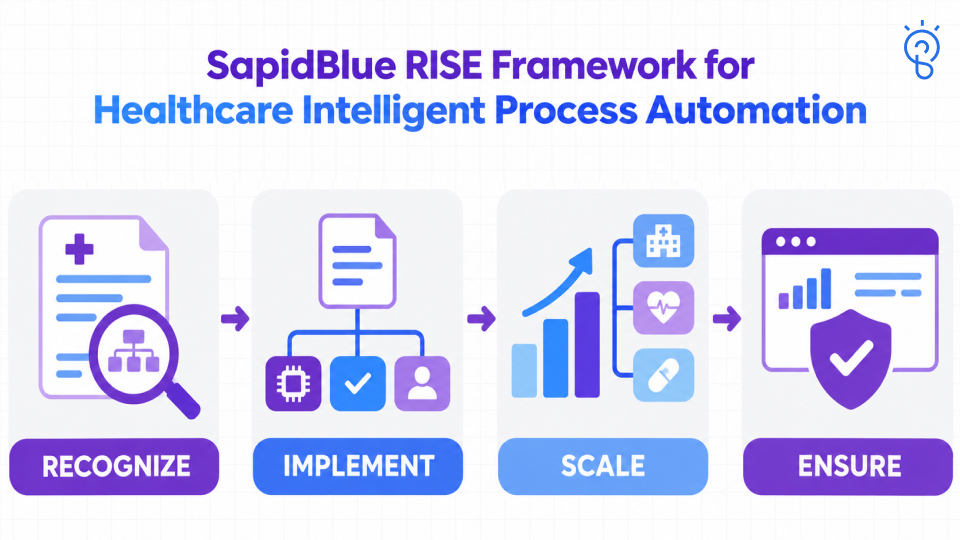
SapidBlue’s RISE Framework can structure the implementation:
- Recognize: Select a worthwhile healthcare workflow, assess readiness, and establish the baseline, constraints, and ownership.
- Implement: Build the bounded process with suitable AI, integrations, validation, and human review.
- Scale: Expand workloads and connected systems when performance, economics, and support capacity justify it.
- Ensure: Maintain security, governance, monitoring, and evaluation as information, rules, and applications change.
Each stage should produce evidence for the next investment decision.
Conclusion
Intelligent process automation in healthcare is most useful when it reduces administrative effort while preserving the evidence and controls needed to complete work correctly.
Choose one process, establish its baseline, and define how exceptions will be resolved. That provides a practical foundation for assessing feasibility and expanding automation responsibly.
Ready to plan delivery? Work with SapidBlue to scope your healthcare automation workflow, integrations, and controlled rollout.


