
 Contact Us

Load testing evaluates whether an application meets performance requirements under expected and peak traffic, while stress testing determines how it behaves when demand exceeds its normal operating capacity. Most business-critical applications need both to validate performance, identify bottlenecks, and assess system resilience and recovery.
The choice depends on your application’s expected traffic, scalability requirements, infrastructure, and business risks. Whether you’re preparing for a product launch, anticipating seasonal traffic surges, or releasing new features, selecting the right testing approach helps identify performance limitations early, improve resource utilization, and minimize the risk of unexpected downtime.
This guide explains the key differences between load testing and stress testing, when to use each, which performance metrics to measure, and how to determine whether your application is ready for production.
What is Load Testing?
Load testing evaluates application behavior under a defined workload that represents expected use. It measures whether response times, successful throughput, errors, and resource consumption remain acceptable.
For example, an online store might expect 300 API requests per second during a promotion. A load test could gradually reach that rate, maintain a stable measurement period, and verify browsing, cart updates, and checkout.
The workload must reflect the transaction mix. Sending every request to a fast product-list endpoint will not establish whether checkout can handle the event.
Microsoft’s performance-testing guidance describes load testing as checking expected volumes under normal and peak usage.
The result should identify the conditions under which requirements were met. “The application handled 5,000 users” is incomplete without the user behavior, request rate, data, environment, duration, and success criteria.
What is Stress Testing?
Stress testing examines how an application behaves when demand exceeds its intended operating range or approaches a capacity limit. The goals include identifying failure points, evaluating controlled degradation, and checking recovery.
For the store expecting 300 requests per second, an illustrative stress test might increase traffic through 450 and 600 requests per second, subject to predefined stopping conditions.
The useful finding is not simply that errors appeared. Determine whether the application rejected excess work predictably, preserved valid orders, prevented duplicate processing, and returned to normal after demand dropped.
Terminology varies. Some tools use “stress” for higher-than-average traffic and reserve “breakpoint” testing for progressively finding the system’s limit.
Define each test by its traffic profile and objective so the team understands what it proves.
Load Testing vs. Stress Testing: What Are the Key Differences?
Both tests use workloads and performance measurements. The difference is the operating condition being investigated and the evidence required to judge the result.
| Aspect | Load testing | Stress testing |
|---|---|---|
| Main question | Can expected traffic meet requirements? | What happens beyond the intended operating range? |
| Workload | Representative normal and forecast peak demand | Increasing or excessive demand relative to the agreed capacity envelope |
| Primary evidence | Response times, successful throughput, errors, and stable resource use | Capacity limits, rejection behavior, failure modes, data integrity, and recovery |
| Meaning of failure | Requirements are missed at an expected workload | Behavior violates the overload or recovery requirements |
| Business use | Release validation and capacity planning | Preparing operating limits and responses to unexpected demand |
| Result | A validated operating range for the tested configuration | An understood boundary and evidence of behavior around it |
A stress test can expose expected rejection without failing its objective. It should fail if, for example, accepted orders disappear, retries create duplicates, or the application cannot recover as required.
How Do Performance, Load, Stress, Spike, and Soak Testing Relate?
Performance testing is the broader discipline. Load and stress testing are approaches within it; they are not three independent alternatives.
Four useful workload profiles are:
| Profile | What changes | Question it answers |
|---|---|---|
| Load | Expected traffic volume and transaction mix | Does the application meet its targets during ordinary and peak demand? |
| Stress | Demand beyond the intended operating range | Where are the limits, and how does the application degrade and recover? |
| Spike | The rate at which traffic rises or falls | Can scaling, admission controls, and queues handle abrupt changes? |
| Soak or endurance | The duration of sustained traffic | Do memory growth, resource leaks, or accumulating backlogs appear over time? |
There is no universal three-type or four-type taxonomy. Smoke tests validate the script at minimal traffic; breakpoint tests explicitly investigate limits.
Select tests for the application’s risks. A long-running processing service may need endurance evidence, while a ticket launch needs particular attention to sudden arrivals.
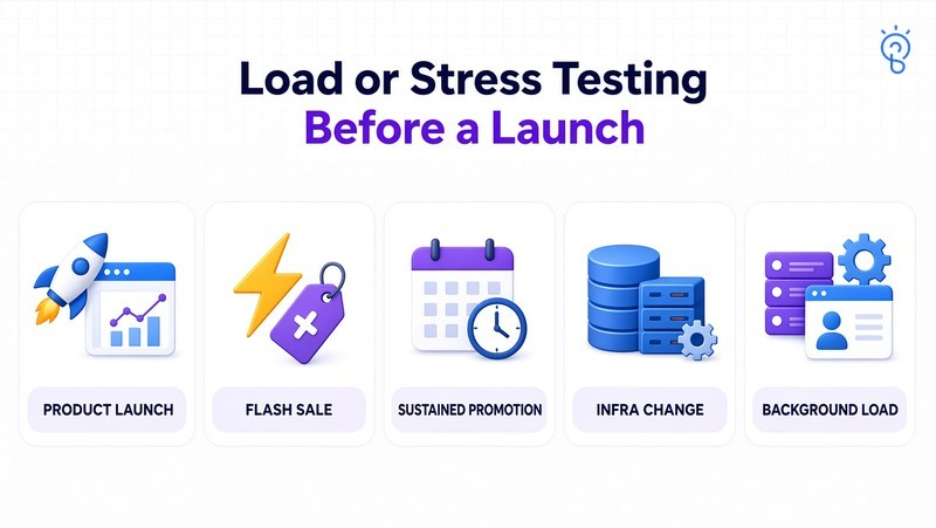
Should You Run Load or Stress Testing Before a Launch?
For a meaningful launch, first demonstrate acceptable behavior at forecast demand, then investigate the consequences of exceeding it. Include spike or soak testing when the event’s shape warrants them.
Prioritize the evidence according to the situation:
- New product launch: Validate important user journeys at the forecast workload and test a plausible excess-demand scenario.
- Flash sale or registration opening: Add sudden-arrival testing; a gradual ramp can hide startup and scaling delays.
- Sustained promotion or reporting deadline: Check prolonged traffic, scheduled jobs, and accumulated queue work.
- Database, cache, or infrastructure change: Repeat the relevant baseline and investigate changes in capacity or recovery.
- Growing background workloads: Test the combined foreground and asynchronous processing demand.
Finish early enough to diagnose and fix the findings. Running a larger test immediately before launch provides little value if the team cannot act on its results.
An arbitrary traffic multiplier is not a forecast. Explain the assumptions behind expected demand, uncertainty, and the operating margin the business requires.
How Do You Determine the Right Testing Load?
Start with the busiest relevant period and model what people actually do. Registered users, active sessions, virtual users, and simultaneous HTTP requests are different quantities.
Use production analytics where available. For a new product, document assumptions from comparable activity, launch plans, and stakeholder estimates, then revise them as evidence improves.
Build a Workload from Business Activity
Consider this hypothetical forecast:
- 90,000 sessions during the busiest hour.
- An average of 12 requests reaching the tested API per session.
- A representative mixture of reads, searches, cart updates, and writes.
The resulting average during that hour is:
90,000 sessions × 12 API requests ÷ 3,600 seconds = 300 requests per second.
This hourly average does not describe short bursts. Model the within-hour arrival pattern and the distribution of expensive operations.
At a steady arrival rate of 25 sessions per second and an average session duration of four minutes, approximately 6,000 sessions overlap. That does not mean 6,000 simultaneous API requests.
For the API itself, a stable rate of 300 requests per second and mean response time of 0.2 seconds implies about 60 requests in flight. These calculations concern different system boundaries and use averages.
Choose an Appropriate Arrival Model
A closed model simulates a fixed user population whose next action follows completion of earlier work. An open model schedules arrivals independently of response duration.
If the application slows down, a closed test can generate fewer new requests. That can understate demand when real arrivals would continue.
Match the model to the system. For an arrival-rate test, provide enough generator capacity and report missed or dropped scheduled work. Configuring 300 requests per second does not establish that 300 were delivered.
Also vary data size, account permissions, cache state, payloads, and record distribution. A tiny repeated dataset can make caching look more effective than it will be in production.
In k6, Iterations Are Not HTTP Requests
A k6 iteration is one run of the scenario function (which may generate multiple HTTP requests). Arrival rate executors will schedule when the iterations start. A setting of rate: 300 with time Unit: ‘1s’ means 300 iterations per second (not 300 requests per second).
If each iteration is making 12 HTTP requests then 25 iterations per second would be approximately 300 requests per second at steady state. 300 iterations per second would be approximately 3,600 requests per second. Branching, redirects, retries and the like will of course all have an effect on the actual number of requests.
What Metrics Should You Measure During Performance Testing?
Measure user outcomes and the resources that constrain them. The same metrics support load and stress tests, but their interpretation changes with the objective.
Extend those signals with application-specific correctness and recovery checks.
| Metric | What to record | Why it matters |
|---|---|---|
| Latency | Median, p95, p99, and end-to-end journey duration | Slow tails can be hidden by the average |
| Traffic and throughput | Offered requests, delivered requests, accepted work, and successful completions | Rejected or skipped work can make reported performance look better |
| Errors | Timeouts, unexpected responses, business failures, and intentional overload rejections | Different outcomes require different explanations |
| Saturation | CPU, memory, I/O, worker utilization, connection waits, and queue age | Identifies resources approaching their useful limits |
| Correctness | Missing, duplicated, inconsistent, or partially completed operations | Fast responses do not establish correct business processing |
| Recovery | Time to restore service targets and clear accumulated work | Demand returning to normal does not guarantee immediate recovery |
A p95 latency of 600 milliseconds means 95% of the measured observations were at or below that value. Define whether those observations are requests, endpoints, or complete user journeys.
Report successful-request and failed-request latency separately. Fast errors can make an unhealthy service appear responsive.
Do not average together instance-level p95 values and label the result the application’s p95. Use an appropriate aggregation of the underlying observations or latency distributions.
What Should the Pass/Fail Criteria Be?
Set criteria before execution and apply them to the relevant phase and workflow. A green tool summary is useful only when the workload and measurements are valid.
Business correctness and operational recovery may require additional assertions and checks.
Example Load-Test Acceptance Criteria
For the hypothetical store, a test plan might require:
- The generator delivers the 300-request-per-second workload with the agreed transaction mix.
- During a defined 20-minute measurement window, successful checkout API p95 is at most 600 milliseconds and p99 is at most 1.5 seconds.
- Unexpected request failures stay below 1%, with failed operations reported separately.
- Accepted checkout requests produce the correct order records, with no missing or duplicate orders observed in the reconciliation.
- Resource use and queue age stay within the application’s agreed operating limits.
These are illustrative values, not industry-wide standards. A background export and a checkout interaction need different targets.
Warm-up and ramp-down should be reported separately where they answer different questions. Do not silently exclude inconvenient samples or use a whole-run average that hides a failing peak period.
Example Stress-Test Acceptance Criteria
Above the validated range, the objective may permit documented overload rejection while requiring:
- Accepted operations preserve business invariants.
- Queues remain bounded and retries do not amplify overload uncontrollably.
- Timeouts and rejections follow the intended contract.
- Alerts identify the overload and the limiting component.
- Service targets return within an illustrative five minutes after traffic returns to the supported range.
- Any remaining backlog clears within a separately defined recovery window.
Record the load at which targets first fail, the limiting resource, and the behavior after traffic falls. A controlled refusal is different from accepting work that cannot be completed.
How Do You Identify Bottlenecks and Failure Points?
Correlate the first user-visible deterioration with application and infrastructure telemetry. An overloaded component observed at the end of a test may be a consequence rather than the original cause.
For example, rising latency alongside database connection waits can indicate contention or slow work holding connections. Low application CPU does not rule out a database, network, or dependency bottleneck.
Investigate the full request path:
- Application execution: CPU profiles, thread or event-loop delays, garbage collection, lock contention, and blocked workers.
- Data access: Slow queries, missing or ineffective indexes, database locks, connection pools, and storage waits.
- Asynchronous work: Queue depth, age of the oldest message, consumer throughput, and retry rates.
- External services: Dependency latency, quotas, timeout policies, and connection reuse.
- Test infrastructure: Generator CPU, network limits, socket exhaustion, and missed scheduled arrivals.
Use traces and query evidence to distinguish plausible causes. Changing several settings at once makes it difficult to identify which change helped.
Repeat the same workload after a targeted fix and compare against the recorded baseline. Confirm that the bottleneck was resolved rather than moved to another component.
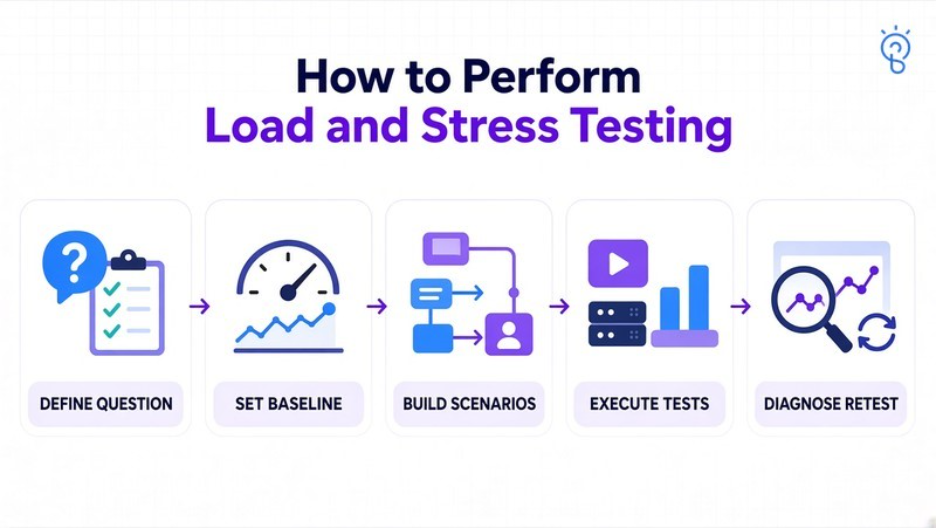
How Do You Perform Load and Stress Testing?
Use a repeatable process that checks the test setup before increasing demand.
- Define the question. Identify the launch, change, or capacity decision and the workflows affected.
- Establish the baseline and targets. Record expected traffic, relevant service objectives, correctness checks, and recovery requirements.
- Prepare a representative environment. Match important infrastructure, database scale, network paths, limits, and scaling policies. Document differences from production.
- Build realistic scenarios. Include authentication, permissions, dynamic identifiers, varied data, think time where appropriate, and actual workflow validation.
- Run a smoke test. Confirm that scripts perform the intended actions and that monitoring captures the relevant signals.
- Execute the planned profiles. Complete expected-load testing, then controlled overload and recovery testing. Add spike or soak scenarios for identified risks.
- Diagnose and retest. Preserve configuration and results, investigate failures, make targeted changes, and verify the outcome.
Define stopping conditions for resource exhaustion, excessive error volume, data-integrity failures, or the approved cost ceiling.
Test autoscaling with its real policies and bounded capacity. Record startup delays, scaling ceilings, and account quotas. If investigating fixed-capacity limits separately, document that configuration rather than mixing both objectives.
Control side effects. Test orders should not trigger real payments, emails, or fulfillment. Coordinate third-party traffic and use appropriate test integrations; a provider’s rate limit is not automatically an application defect.
Retain test data, application version, infrastructure settings, scripts, traffic mix, and timestamps so later results can be interpreted.
How Often Should You Test a CI/CD Pipeline?
Use short tests for fast feedback and broader tests when the release risk warrants them. A possible schedule is shown below; it is an implementation starting point rather than a universal rule.
| Trigger | Suitable activity | Decision supported |
|---|---|---|
| Relevant code change | Smoke test and a short, repeatable performance regression check | Is the script valid, and is there an obvious regression? |
| Scheduled staging run | Representative load test and trend analysis | Is baseline performance changing? |
| Major release, architecture change, or important event | Peak-load, stress/recovery, and relevant spike or soak testing | Does the tested configuration support the planned release? |
Full stress tests rarely belong on every small commit. Their environment preparation, analysis, recovery, and cost can exceed the value of immediate repetition.
Compare equivalent workloads, data, and configurations. Investigate unstable results before using them as release gates. Repeated failures should produce an owned engineering action, not a habit of rerunning until the dashboard turns green.
Which Open-Source Tools Can Run Load and Stress Tests?
Several tools can generate both profiles. Select for protocol support, scripting needs, workload scheduling, reporting, and the team’s ability to maintain the suite.
The options below are based on documented capabilities, not a hands-on ranking.
| Tool | Useful fit | Consideration |
|---|---|---|
| Grafana k6 | Scripted tests using JavaScript/TypeScript, scenarios, thresholds, and browser capabilities | Configure the arrival model and generation resources for the workload |
| Apache JMeter | Graphical test-plan development and protocol testing, including HTTP, JDBC, and JMS | Use CLI execution for load generation and minimize resource-heavy listeners |
| Locust | Python-defined user behavior, CLI execution, and an interactive web interface | Design pacing and load generation around the required arrival pattern |
Open-source licensing does not make the testing program cost-free. Budget for generators, environments, data preparation, observability, analysis, and script maintenance. Hosted services or additional features may have separate terms.
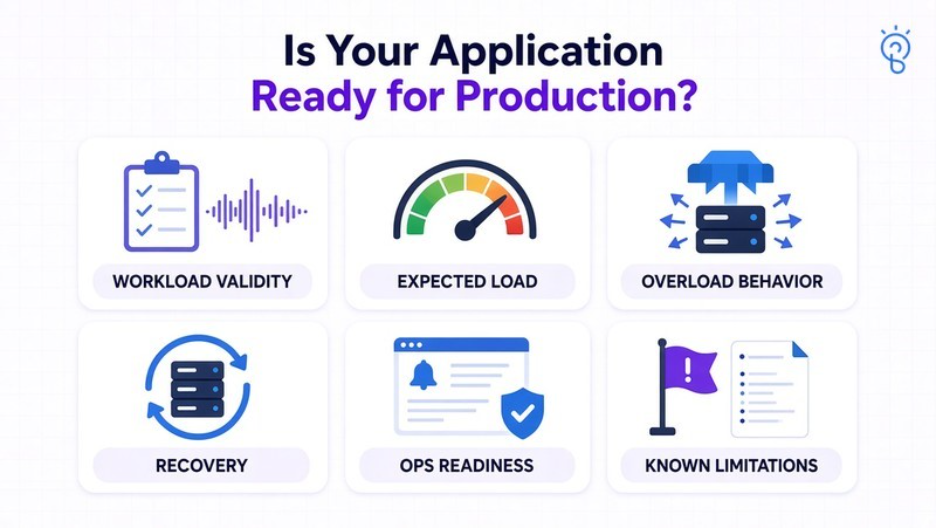
How Do You Know Whether an Application Is Ready for Production?
Performance evidence supports a release decision within tested conditions. It does not certify that every production scenario will succeed.
A useful readiness record should establish:
- Workload validity: The agreed arrival pattern, transaction mix, and data distribution were actually delivered.
- Expected-load performance: Important workflows met their service targets at forecast demand.
- Overload behavior: Rejections, queues, retries, and accepted operations behaved as designed.
- Recovery: The application regained its targets and reconciled outstanding work after overload.
- Operational readiness: Monitoring, alerts, support ownership, scaling limits, and rollback procedures were exercised.
- Known limitations: Environment differences, dependency substitutes, and untested scenarios are visible to the release owner.
A small staging environment can reveal regressions without establishing production capacity. Likewise, successful API responses do not prove that a page renders quickly or that a downstream job finishes on time.
Preserve a defined operating range and the evidence behind it. Update that range when application behavior, infrastructure, data volume, or traffic patterns materially change.
How SapidBlue Helps with Application Performance Testing?
Application performance testing requires coordination across user journeys, infrastructure, data, and operational controls. SapidBlue’s performance and load testing services cover workload planning, load and capacity testing, stress and spike testing, and performance investigation.
Relevant support includes:
- Test strategy and benchmarking: Define representative scenarios, measurable targets, and acceptance criteria.
- Load and capacity assessment: Evaluate expected workloads and identify the conditions under which service targets hold.
- Stress, spike, and resilience testing: Examine limits, sudden demand, and recovery behavior.
- Performance optimization: Investigate constraints and verify the effect of targeted changes.
- Repeatable automation: Connect reusable testing and reporting to the delivery process through test automation engineering.
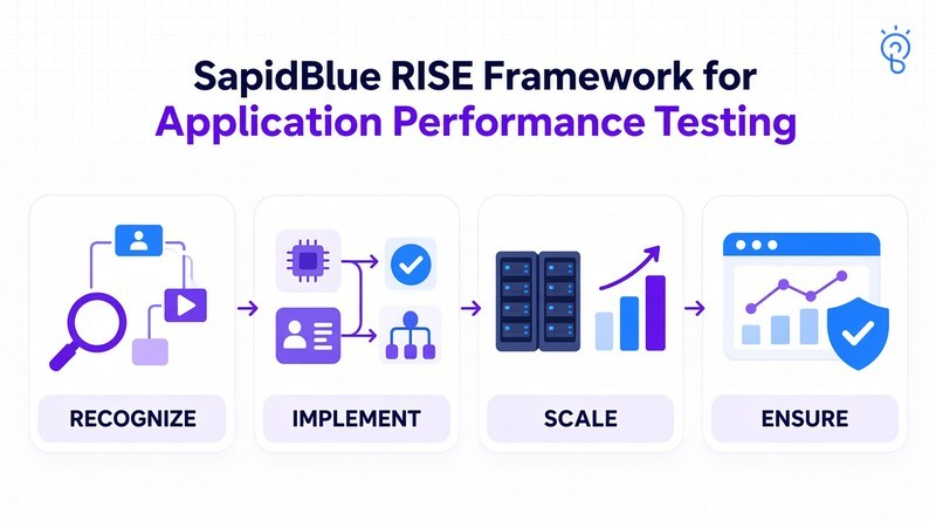
SapidBlue’s RISE Framework provides four stages that can structure this work:
- Recognize: Identify business-critical journeys, traffic risks, environment gaps, and the evidence needed for release.
- Implement: Build scenarios, instrumentation, and measurable acceptance checks around the application.
- Scale: Evaluate increasing demand, scaling behavior, capacity limits, and resource costs.
- Ensure: Maintain regression coverage, monitoring, recovery evidence, and ownership as the application evolves.
The output should be an actionable performance assessment tied to a particular application version and configuration.
Conclusion
The load testing vs. stress testing decision is usually a question of sequencing and scope. Validate expected demand first, then examine the behavior outside the supported range.
Agree on the workload and business outcomes before generating traffic. Use the findings to set operating limits, resolve bottlenecks, and define the release conditions the team can support.
Ready to establish your application’s performance limits? Work with SapidBlue to plan testing, diagnose constraints, and validate launch readiness.